
App-report register checked on 19 October 2026 (Europe/Warsaw); platform instructions checked on 18 October. Vendor update times below are in UTC.
For a redirect happening now: in Online Store, use Public → Private → Update to restrict public access (Shopify’s instructions), then contact Shopify Support and the implicated developer. Keep the customer’s existing URL/screenshot and the time; do not ask them to enter details again. You do not need to find the cause before stopping further exposure. The full containment steps explain how to check the restriction and its scope.
If you only have an app name from a report, first establish whether your store was within scope; installation alone is not proof of compromise.
You can follow this guide in order, or go straight to the delisting-cluster warning, the app register, store-access controls, the support handoff, reopening, or customer communication.
Start with the situation you have
| Your situation | First action | Then |
|---|---|---|
| A customer or a test reached an unexpected payment form | Preserve the report and contain the affected path | Follow the response steps below; contact Shopify and the developer immediately |
| A provider says your store was affected | Keep the notice and follow its store-specific containment instructions | Ask for the exposure period, remediation, and customer-impact information |
| You use a named app but have no report or symptom | Check the exact app, developer, and any notice for your store | Run a fresh-session path check and ask the provider whether your store was in scope |
| Your app is not named, but checkout behaves unexpectedly | Investigate the behavior and contain an observed unsafe path | Do not treat an incomplete app register as proof the store is safe |
A normal result today cannot establish that nobody was exposed earlier. Likewise, a provider’s fix does not identify every shopper who may have reached a fake form.
A suspicious cluster of app delistings
Warning: the archive snapshot we reviewed marks 126 apps as delisted, including 89 entries dated 15 October 2026. That concentration warrants investigation and a check of the apps your store relies on. It does not establish that all 126 apps were compromised or that the removals share one cause.
Keep this broader list separate from the incident register below. Download the 126-row delisting snapshot: every app’s cause of delisting is marked unverified. The snapshot does not explain whether its dates record actual removal or when the tracker noticed it; neither date establishes when an app was compromised.
Shopify documents other reasons for delisting. Its API versioning policy says apps that continue using unsupported resources after an upgrade deadline are delisted. The schedule lists 16 October 2026 at 15:00 UTC as the end of accessibility for API version 2025-10. That is an alternative explanation to investigate around this period; we have no evidence connecting it to this batch.
We have not found a public Shopify statement connecting the 126-app list, or the 89 entries dated 15 October, to one security incident. The documented checkout hijacks also do not establish one shared attacker across all the apps.
If you use an app in the snapshot, ask its developer why it is unavailable, whether existing installations are affected, and whether any incident notice applies to your store. An observed unsafe redirect calls for immediate containment. An archive entry alone calls for investigation, not an automatic compromise verdict or a blanket uninstall.
Which apps have been linked to the reports?
The public evidence supports the following entries as of 19 October 2026. Each row gives the incident date and the kind of evidence behind it: a firsthand report, a vendor-confirmed outage, or a vendor-confirmed phishing incident. The register covers apps named in public reports. An app missing from it is not cleared, and a listed app is not a live safety rating.
| App and incident date | Evidence and reported remediation | What to do for your store |
|---|---|---|
| Hulk Product Options — observed 10 October 2026 | Roman Zipp’s firsthand investigation traced a redirect through this app’s configuration. A HulkApps response reproduced there says unauthorized code was removed and controls strengthened. That is the vendor’s account, not a check of your store. | Check this exact app and your provider notice. Ask whether your store was affected and what was changed. This row does not implicate every HulkApps product. |
| Selleasy — 13 October 2026 | LogBase’s notice updated 16 October confirms injected scripts and external phishing redirects. The vendor says it removed the code that day and commissioned an independent investigation. | Ask for the scope and exposure period for your store, plus evidence of remediation. The notice’s backend/database finding does not rule out information submitted on an external form. |
| Swym Wishlist Plus — 14 October 2026; vendor account reproduced by Zipp | In the vendor account reproduced by Zipp on 19 October, Swym says an unauthorized configuration change loaded a script on a limited subset of stores and could redirect checkout clicks to an imitation payment site. It dates configuration changes to about 10:06–11:56 UTC and progressive mitigation to 15:02–16:32 UTC. Swym reports removing the code, reverting configuration, securing the access channel, rotating credentials, and adding sanitization; investigation continues. This is the vendor’s account through Zipp, alongside the agency’s firsthand report. | Ask which of Swym’s notices applies to your store: the general notice or the targeted notice to stores whose logs showed the script loading. Get your store’s exposure window and remediation details. Swym’s finding about data held in its own systems does not settle what shoppers may have entered externally. |
| Boost AI Search & Filter / Search & Discovery — reported 17 October 2026 incident | The same agency post attributes a separate checkout redirect to Boost and says investigation is continuing. Boost’s official service notice, updated 18 October at 21:39 UTC, says its storefront extension was restored at 18:19 UTC. It does not identify a phishing or unauthorized-access cause. | Ask Boost about the allegation and your store’s exposure separately from service restoration. These Boost names refer to one app; this is not Shopify’s own Search & Discovery app. A working product grid does not settle the earlier redirect report. |
| Privy popups/displays — checkout-hijack allegation dated 17 October 2026 | A commenter under Zipp’s investigation attributes the behavior to Privy, without a technical trace. Privy’s official outage notice confirms display disruption but its current text does not establish checkout interception. After an initial recovery, displays went offline again; the 18 October, 21:00 UTC update says work on a fix continues. | Ask Privy for the scope and instructions for your store. Keep the merchant allegation separate from the vendor-confirmed outage. The earlier operational update is not the latest status, and an outage does not establish that every customer was compromised. |
Earlier reports and related incidents
These dates and evidence levels matter if an older app name appears in a warning you receive.
| App and incident date | What is supported | What to do with the report |
|---|---|---|
| Qikify Sticky Add to Cart — 22 July 2026 | Qikify’s own notice confirms the earlier redirect incident and says it was resolved in July. Its October clarification separates that case from the October reports. | Check the exact app and any store-specific notice. This is historical context, not a current compromise warning. |
| Qikify Mega Menu & Navigation — 22 July 2026 | A separately named app in the same vendor-confirmed July incident, also described as resolved. | Do not expand the finding to every Qikify product or treat August relisting as a new incident. |
| Hextom Announcement Bar — merchant-reported 30 August 2026 incident | A Reddit commenter reports the same fake-checkout appearance and names this app. The comment supplies no exact App Store identifier; vendor-confirmed scope and remediation were not established. | Confirm which product you used and ask Hextom about your store and the reported date. This does not implicate Hextom’s whole catalog or establish current compromise. |
| Orichi OC Quantity Breaks & Limit / OC Quantity Breaks Order Limit — 11 September 2026 | Orichi’s official incident report confirms malicious JavaScript inserted into campaign Custom JS, interception before genuine checkout, and redirection to a fraudulent external page. The vendor dates possible serving to 09:29–18:00 UTC+7 on 11 September, says it removed the code that day, and reports relisting on 8 October after security requirements were completed. | Ask Orichi whether your store had an affected campaign and request its exposure window and log findings. The September incident is historical; relisting does not answer whether earlier shoppers submitted details on the external form. |
Fast Bundle is a related historical security incident, with a different evidence limit. Its official status chronology confirms a security attack on 17 July 2026 and reports remediation and full App Store reinstatement by 3 August. That chronology does not establish a fake-checkout mechanism. It should not be counted as another confirmed October checkout hijack.
Names from precautionary lists also need checking. We have not established checkout-hijack involvement for Hulk Contact Form Builder, Swym Back in Stock Alerts, or Hextom Free Shipping Bar. A merchant’s earlier allegation about Hulk Advanced Wishlist also lacks a verified incident date and technical account in the sources reviewed. Co-installation, a shared developer, or an unavailable listing is not enough to add an app to the confirmed cases.
An unavailable App Store listing, a disabled extension, removal of malicious code, and a merchant’s return to trading are different events. Ask what actually happened to the component installed on your store.
1. Contain an observed redirect
If you know which component is implicated, disable the affected behavior while involving its developer. If you cannot reliably isolate the unsafe purchase path, restrict access to the Online Store while Shopify and the developer investigate.
Shopify’s documented desktop controls, checked on 18 October 2026, are:
- Open Online Store in Shopify admin.
- Open the access menu labeled Public.
- Choose Private and click Update.
An alternative is Online Store → Preferences → Store access → Private mode. Choose a store-access password separate from your admin-login password, then save. See Shopify’s store-access instructions.
Check the result from a browser session that is not signed in and has no visitor password saved. It should reach the access page rather than the public shopping path. Keep the access password with the people investigating; sharing it publicly defeats the restriction.
These controls restrict the Online Store. Tell support about any custom storefront or other purchasing channel and confirm what remains reachable. Pausing an ad or a checkout button alone does not account for every route a shopper may already have open.
For an implicated app embed, open the live theme’s Edit theme → App embeds, switch off the relevant embed, and save. Shopify documents those controls under theme apps. Keep a record of the change. An embed is only one possible integration surface: switching it off does not prove all code from that app is gone.
Capture what you can promptly while containing the problem. Do not keep an unsafe path open just to obtain a better recording.
2. Keep a small, useful evidence record
Save the customer’s existing report instead of asking them to reproduce it or enter payment information again. Record:
- when it happened, including the timezone;
- the page and action immediately before the diversion, such as the cart drawer’s Checkout button;
- the unexpected destination and any existing screenshot;
- browser/device details if available;
- app/provider notices and relevant recent changes;
- the time and substance of each containment action.
Keep full customer reports in a restricted place. Redact tokens and personal information before posting URLs or screenshots in a public forum. Do not collect card numbers or security codes as evidence; they are not needed for the handoff.
App removal or clearing settings can make evidence harder to reconstruct. Keep notices and a record of the implicated settings where you can do so safely. Ask the provider what additional evidence it needs and how to send it securely.
3. Check the actual purchase routes
The useful question is whether the customer’s path matches the store’s intended payment flow. A legitimate processor may use another domain, so “every external domain is malicious” is the wrong test. Establish expected destinations from your configured payment methods and the platform/provider when needed.
For each route your store actually offers:
- Open a new private browsing session, with other private windows closed first so you do not reuse their session.
- Add an ordinary product and use the intended purchase control: cart page, cart drawer, or direct-buy button.
- Observe the destination and page before entering personal or payment details.
- Record the route, device/browser, time, and result. Stop on an unexpected form and return to containment/support.
Do not submit real details to an imitation page to test it. Technical investigation of suspicious code belongs with the response team.
Fresh sessions matter because the documented Hulk-related script used session storage to suppress a repeated diversion. A second attempt in the same session could therefore look normal. The original investigation describes that behavior.
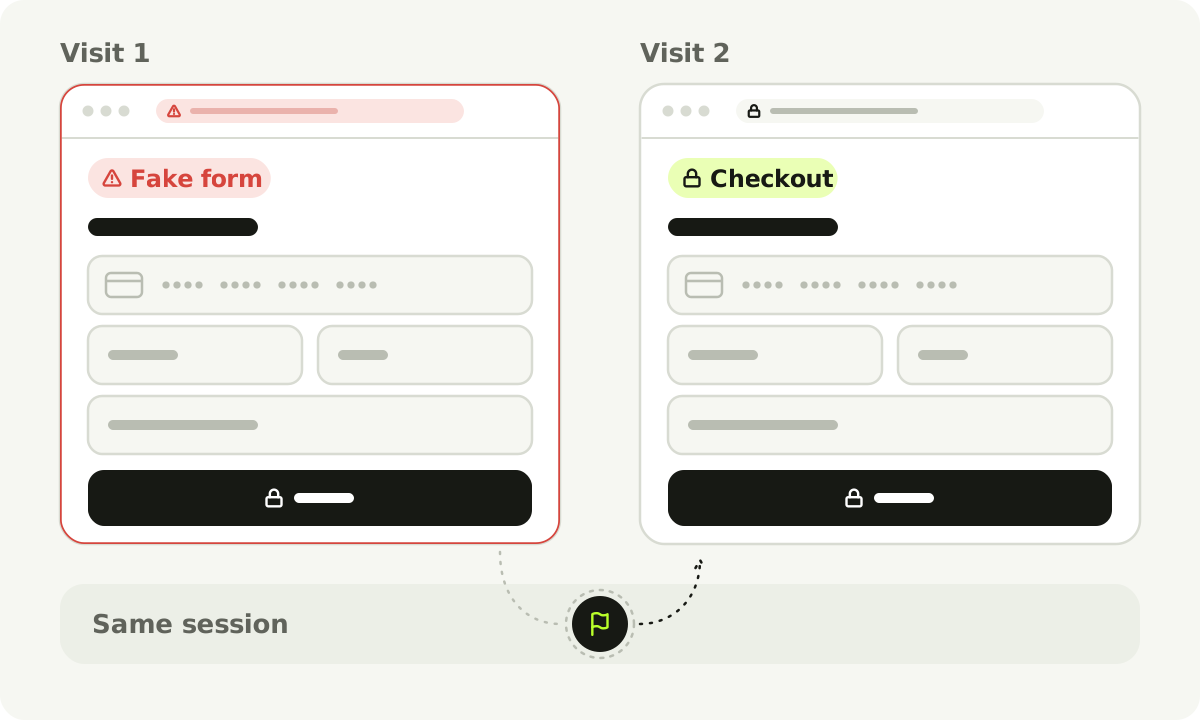
The session behavior documented in the Hulk-related investigation. Other incidents may not work the same way.
Record fresh-session checks and reports from returning customers separately. Ask the provider whether previously loaded configuration or browser-stored state needs remediation. Clearing your own browser does not answer what other shoppers experienced.
If a provider has already identified your store as exposed, keep investigating that period even when the current path behaves normally.
4. Send one useful support handoff
For an observed redirect, contact Shopify Support and the relevant developer. Open the Shopify Help Center through a known route. For the developer, Shopify documents Settings → Apps → the app’s menu → Get support. If the app is no longer listed or that option is unavailable, use the provider’s official website or ask Shopify for assistance. Shopify’s app-support guide explains the routes.
For Selleasy’s disclosed incident, LogBase lists [email protected] in its official notice. Include your existing case number so the store’s history stays together.
Copy this handoff, or download it as plain text:
Store and contact:
Shopify case number / developer case number:
Exact app and developer:
What we observed (or the provider notice we received):
First / last known observation, with timezone:
Purchase route and device/browser:
Current access restriction or disabled component:
Actions taken, by whom, and when:
Evidence available through a secure channel:

Please confirm:
1. Was this store within scope, and what is its exposure period?
2. Which component or setting was affected, and what was changed?
3. What information could customers have submitted externally?
4. Does remediation account for previously loaded/stored configuration?
5. What evidence verifies the fix for this store?
6. Is any platform restriction still in place, and who resolves it?
7. Who owns the next update, and when should we expect it?
Keep investigation, removal, exposure, and permission to resume trading as separate answers. A generic “the app is safe” reply does not supply that record. Equally, routine developer-support response timings are not a reason to wait before escalating an observed live diversion.
5. Verify removal and assess the exposure period
Follow the provider’s store-specific remediation steps. Record which extension, configuration, or code was changed and whether your team needs to do anything further.
Uninstalling is not always complete cleanup. Shopify says some apps leave theme code and require additional steps. Its uninstall guidance also covers app dependencies and data. Do not delete unfamiliar code blindly or uninstall unrelated tools in bulk. Use the provider’s removal instructions; the app audit/removal guide has a routine removal sequence.
Review relevant account access and provider-dashboard access with the response team. Shopify’s secure sign-in guidance supports stronger account protection. Changing a password or enabling two-step authentication does not itself remove a malicious script delivered through a supplier.
For impact assessment, establish the store-specific exposure period, possible form fields, known reports, and the evidence behind each finding. A visitor may have submitted details on a fake form without completing a real order. Completed orders are therefore not a complete list of potentially exposed people.
A vendor’s statement that its own database was not breached concerns a different system from an external phishing form. Keep that distinction in internal records and customer communications. The Selleasy disclosure illustrates why the questions need separate answers.
6. Check the fix and coordinate reopening
Before resuming a restricted purchase path, assemble one closure record:
| Question | Record the answer and its source |
|---|---|
| What was fixed? | The affected component/setting, remediation, and provider confirmation |
| What was checked afterward? | Fresh and relevant returning-session observations; cart, options, totals, and the intended payment route |
| Are restrictions outstanding? | Any Shopify instruction or other block, and the named person/team resolving it |
| What is known about past exposure? | The investigated period, findings, and unresolved questions |
| Who owns the next action? | Restoration decision, further investigation, and customer updates |
Where Shopify has instructed you to keep access restricted, resolve that instruction with its team. A provider’s component fix and a platform reopening decision can be separate. The WAGD case reported on 16 October, updated 17 October describes that coordination problem; it is a dated case, not a claim about the store’s status today.
Validate the legitimate features containment may have disrupted: required product choices, quantities, cart totals, and the intended checkout. Once the response team confirms the genuine path and any restrictions are resolved, use the platform/provider’s approved testing method for a complete purchase check. Never test payment on the suspected imitation page.
Keep the past-exposure investigation open if it still has unanswered questions. Reopening and closing every customer-impact question need not happen at the same moment; record who is responsible for each outstanding item.
7. Give customers accurate, useful information
Customers need facts, actions they can take, and a place to get an update. Keep confirmed observations, provider findings, and unanswered questions visibly different.
For example, “we removed the affected app” describes an action. It does not establish “no customer information was submitted.” Do not turn missing evidence into reassurance or publish sensitive evidence that creates another exposure.
The US FTC’s business response guide recommends an accurate communications plan and clear answers to likely questions. Notification duties, deadlines, and payment-provider requirements depend on the business, the incident, and where you trade, so have your adviser or payment provider confirm them early. The outline below covers the facts; it is not legal wording.
Subject: Update about the checkout issue at [store]

On [date/time and timezone], we [confirmed observation or notice received].
[Explain the verified behavior in plain language.]

We have [actions actually completed].
Our provider has confirmed [finding, source/date, and its scope].
We are still establishing [remaining questions].

If you [relevant customer circumstance], [action confirmed with the
response/payment team; do not invent an all-clear or exposure finding].

For help, contact us through [official contact route].
We will post the next update at [location] by [time/date you can meet].
Only fill fields you can support. If someone says they entered card details on a suspected phishing page, direct them promptly to their card issuer through a trusted contact route; do not ask them to send the details to your support inbox. Keep records of what you told whom and when.
When the immediate pressure has eased
Keep the incident timeline and provider findings. Use them to remove unnecessary dependencies and make future changes easier to trace. Our app audit guide provides a worksheet for that later pass; it is not work you need to complete before containing a live problem.
We build Setka, where store code, supported integrations, and payment navigation stay within the platform’s controlled architecture. Our store security-model explanation describes that boundary for merchants considering a different operating model. Your immediate task remains getting the present store and its customers through the incident.